
What you need before you start
Three things have to be true before a single message can go out. If any one of them is missing, the module will still open, but sending will not work.A connected number
You either connect a number you already own, or you buy one from EzFlow inside the app. This is
the longest step, because Meta has to check the number.
An approved template
WhatsApp does not let you send whatever you like to people who did not message you first. You
write the message in advance and WhatsApp reviews it.
Credits
Every message costs credits. A reminder costs 1 credit, a marketing message costs 5, and replies
from your customer are free.
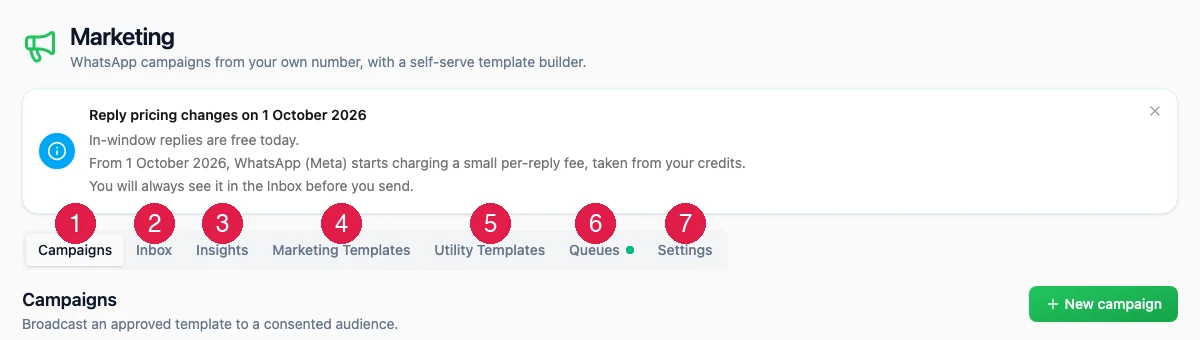
The seven tabs
Marketing messages and utility messages are not the same
This is the single idea that explains most of the rules in this module, so it is worth getting straight before anything else. A utility message is one your customer is expecting because of something they did. A booking confirmation, a reminder the day before a class, a receipt after they pay. These cost 1 credit and WhatsApp approves them quickly. A marketing message is one you decided to send. A promotion, a discount, an invitation to come back. These cost 5 credits, WhatsApp reviews them more carefully, and you may only send them to people who agreed to receive them.How long things take
Nothing in this module is instant, and the waiting is the part that surprises people most. These are the real waits, not the best case.The order that works
1
Connect a number
Do this first. It is the longest step and nothing else works without it.
See Add a number.
2
Write a template and submit it
Write the message, add the personalised bits, check it, and submit it for review.
See Templates.
3
Wait for approval, then set it active
Watch it move across the board in Queues. When it says
Approved, press Set active.
4
Send a campaign
Pick the audience, pick the template, check the cost, and launch.
See Campaigns.
5
Answer the replies
Replies land in the Inbox. Answer inside 24 hours and it is free.
Where to go next
Add a number
The first thing to do, and the longest.
Templates
Write the message and get it approved.
Campaigns
Send it to a group of customers.
Troubleshooting
When something is not working.