
Meta’s verification code never arrives
Almost always because the code was asked for as a text message on a number that cannot receive one. A number bought through EzFlow in Malaysia is a landline. It can take calls and it can never take a text. Meta selects Text message by default, so if you clicked straight through, you asked for something that cannot happen. What to do. Wait out the countdown Meta shows you, then choose Phone call instead. The wait gets longer each time this happens, roughly a minute, then an hour, then close to three hours, so it is worth getting right on the next attempt rather than trying again straight away. The full walk through is on Add a number.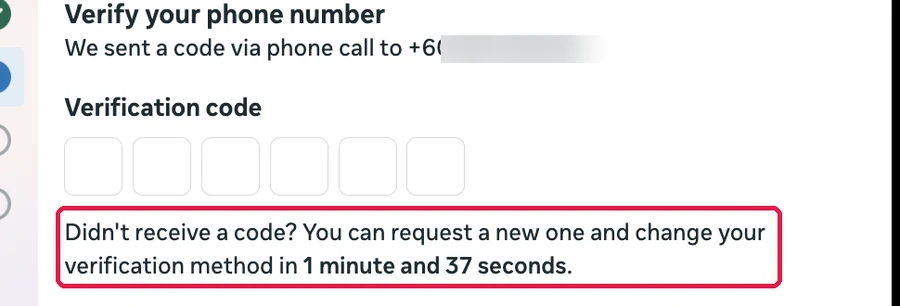
The phone rings but the call sounds wrong
If you hear ringing and then a message saying the phone is switched off or out of coverage, the call is reaching the network but not reaching you. Check that the phone the number forwards to is switched on, in coverage, and not blocking unknown numbers. When it works you will hear a recorded voice say it is connecting your WhatsApp verification call, and then read out the code.Meta said the number was connected, but EzFlow does not show it as Active
Look at the badge on the number’s card in Settings. Registering. Meta’s part is done. WhatsApp is finishing the registration on its side. The card checks itself every ten seconds and turns Active on its own, usually within a minute or two. If the display name needs Meta’s review it can take longer. Nothing to press. Setting up, with a blue box headed This number is not connected yet. The sign-in never reached EzFlow. Press Finish connecting on the card and go through Meta’s window once more.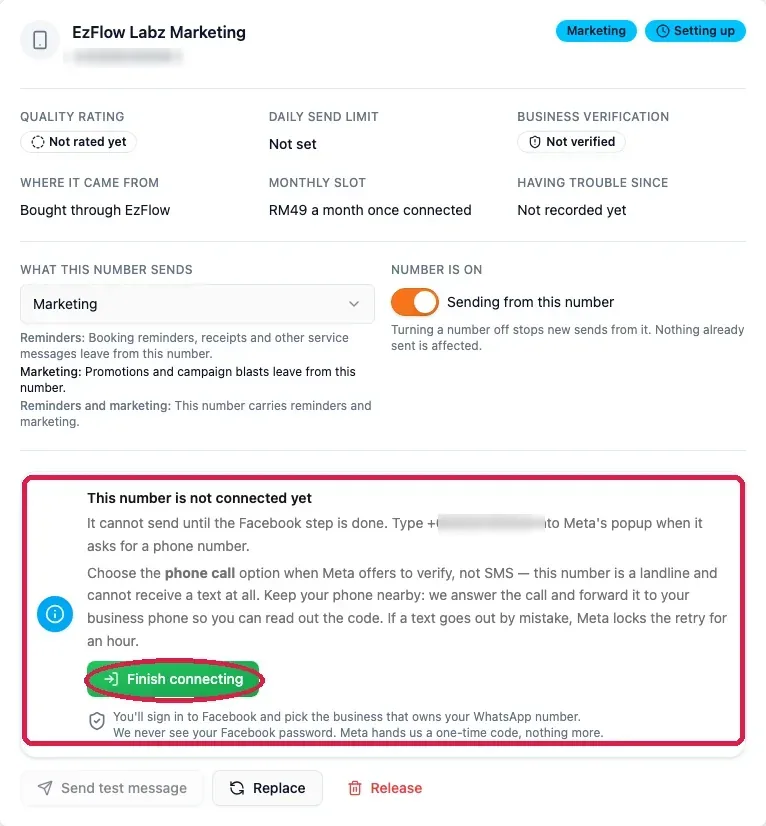
A template was rejected
Read the reason on the card in Queues, then check these in order.1
Was it submitted as the wrong type?
A message that promotes anything is Marketing, not Utility. This is the most common rejection by a
distance.
2
Are the placeholders numbered correctly?
They must start at
{{1}} and count up with no gaps, and every one must have a sample in the Personalize section.3
Does it read like spam?
Shouty capitals, several exclamation marks, or a promise about money will get refused.
4
Does your display name match your real business?
If this is the problem, it is fixed on the number, not on the template.
A template has been in review for a day
If your business is not verified with Meta, this is normal. Review can take up to 72 hours while you are unverified, and nothing you do will speed it up. Resubmitting does not help and can cost credits for nothing. The real fix is Meta Business Verification, which brings most reviews down to minutes. It needs real documents, usually your SSM certificate with a name and address matching what you gave Meta, and it takes days to weeks. Start it before you need it.The template is approved but the campaign wizard cannot see it
Approved is not the same as active. Open Marketing Templates or Queues, find the approved card, and press Set active. Only templates that are approved and active appear in the campaign wizard.A campaign sent to fewer people than the audience count
This is the limits working, not a fault. Three things remove people from a send, and no credits are spent on a skipped customer.- They replied STOP and are on the do-not-message list.
- They already received their weekly maximum, shown as “Weekly message limit reached for this client”.
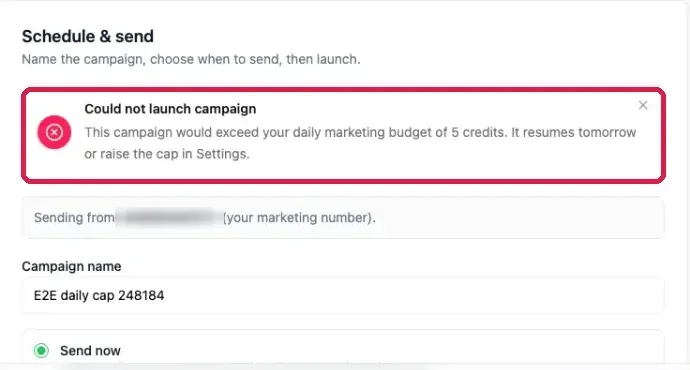
- Your own daily credit cap stopped the campaign early.
Messages are failing
Check Number health in Settings first. A falling quality rating or a daily limit you have already hit will explain most of it.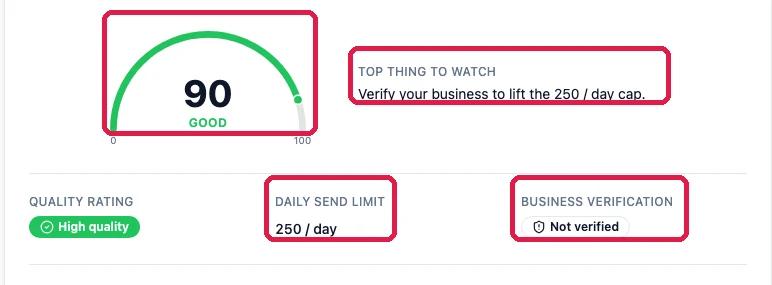
The quality rating is dropping
Stop sending campaigns and look at what went out recently. Rating falls when people block you or report you, and the usual causes are messaging too often, messaging people who never really agreed, or sending at unsociable hours. Send less for a while, keep your quiet hours sensible, and make sure your marketing templates carryReply STOP to opt out in the footer so leaving is easy. A rating usually recovers on its own once the
behaviour changes.
”Too many requests for this action”
Every button that sends, buys or submits something has a ceiling, so a stuck finger or a script cannot run it in a loop. Nothing was sent and nothing was charged when you see this message.
Wait for the window to pass and try again. If you were not pressing anything, someone else on your
account was, so check with your team.
”Only the account owner can do this”
Adding, buying, replacing and releasing numbers are tied to the account owner’s sign-in, because each one changes what you are billed. Ask the owner to do it, or sign in as the owner.Nothing can be sent at all
Work down this list in order. The first thing that is missing is the answer.1
Is a number connected and active?
Check Settings, then Your numbers.
2
Is the number switched on, and does its purpose include what you are sending?
On the number’s card, Sending from this number must be on, and a number set to Reminders
will not send a marketing campaign.
3
Is there an approved template, set active?
Approved is not enough on its own. Press Set active on it.
4
Do you have enough credits?
The credits chip at the top right of the module shows your balance. A marketing message costs 5.
5
Are you inside your daily cap and quiet hours?
Both are in Settings, under Sending limits and Quiet hours.
Related
Add a number
The full connection walkthrough.
Queues
Where rejections show up.
Settings
Health, limits and opt-outs.